


Homey - Chores and Allowance
2.8252.00 Reviews
App Specs
- Version
- 6.2.8
- Updated On
- License
- Free
- Downloads
- 100,000+
- Developer
- HomeyLabs Inc
- Categories
- Parenting
- Platform
- Android
Screenshots
 Analysis by AppCompare
I find Homey - Chores and Allowance most useful when a family wants chores and pocket money to feel connected rather than managed in two separate places. It is a parenting app from HomeyLabs Inc, and its central idea is easy to understand: give children a clear view of household tasks, then use an allowance balance and personal goals to make money decisions part of the same routine. That can be a helpful fit for parents who want more structure without turning every conversation into another reminder.
Before choosing it, I would think about what is actually causing friction at home. If the issue is remembering who should do what, a shared checklist may be enough. If the harder part is keeping expectations consistent and explaining how completed work relates to spending, saving, or donating, Homey’s combination makes more sense. It is free to install, though in-app purchases range from $0.99 to $49.99 per item, so I would check the purchase options before building a family routine around it.
Choose a routine before choosing an app
The most useful setup starts with a short conversation, not a long task list. Decide which chores are regular responsibilities, which are occasional jobs, and whether every task should earn money. That distinction matters: if children earn an allowance only for a few agreed jobs, the app can help make that arrangement visible; if every ordinary contribution becomes a transaction, it may create more bargaining than cooperation.
I would begin with a handful of age-appropriate tasks and clear completion standards. “Tidy the bedroom” can mean very different things to a parent and a child, while a more specific instruction gives everyone a fairer basis for approval. Photos can help show what a task involves, but they work best as an example rather than as a demand for a perfect-looking result. A simple, repeatable standard is easier to maintain than a detailed checklist that parents stop checking.
Where chores and money reinforce each other
Homey has a useful advantage over a basic family to-do list: it brings allowance tracking and financial goals into the same household routine as chores. Children can work toward saving, spending, or donating goals, giving parents a practical opening to talk about choices. The goal does not need to be an expensive purchase. Even a modest target can help a child understand that money set aside for one purpose is not automatically available for another.
One realistic use is a Sunday reset. A parent reviews the coming week with the children, assigns recurring jobs, and agrees on what “done” means. During the week, a child marks a task complete, and the parent checks it before approving it. At the end of the week, the family can look at the allowance balance and decide how much goes toward a chosen goal. That sequence makes the app a record of an agreement, not a substitute for making one.
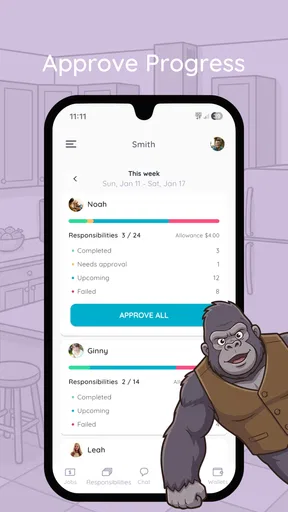
A less obvious benefit is that approval creates a natural place to give specific feedback. Instead of a vague “good job,” a parent can point out that the dishes were put away carefully or that a missed task needs another try. I would keep corrections calm and consistent, though. If approval becomes a surprise inspection or a way to change the rules after work is done, the tracker can feel unfair and undermine the motivation it is meant to support.
Worth Reading Before You Choose

EA SPORTS FC Mobile 26 Is a Bigger Football Game, but It Takes Time

Flipboard Shows What News Apps Must Do Beyond the Feed

Switching to Android Auto Means Rethinking Your Driving Routine

Google Calendar Makes a Crowded Week Easier to Manage

Ludo King Makes the Most of the Minutes Between Plans

Baby Panda World Brings Quick Play to Modern Phones, but Its Game Library Feels Busy
Getting Started with Homey
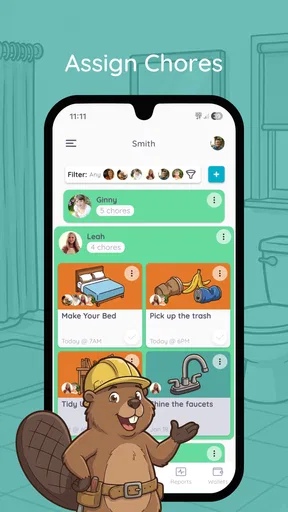
First things first, downloading and setting up Homey - Chores and Allowance is a breeze. Available for both Android and iOS, the app kicks off with a simple, user-friendly interface that even the least tech-savvy among us can navigate with ease. Once you’ve got it up and running, you’re greeted with a colorful dashboard. This is where the magic begins.
Creating profiles for each family member is straightforward. You can assign specific chores and set up recurring tasks. The app allows you to categorize tasks based on rooms or types, which is super handy if you’re a neat freak like me. What’s more, you can attach photos to tasks, making it easier for everyone to understand exactly what needs to be done.
When setting up those profiles, I would resist the urge to add every possible household job on day one. A smaller list makes it easier for children to see what matters and for parents to keep approvals timely. It also exposes whether the family actually likes using a shared digital board or would rather keep a paper chart in a visible spot. After a week or two, you can adjust the routine based on what is being forgotten, disputed, or completed without prompting.
The Allowance Feature
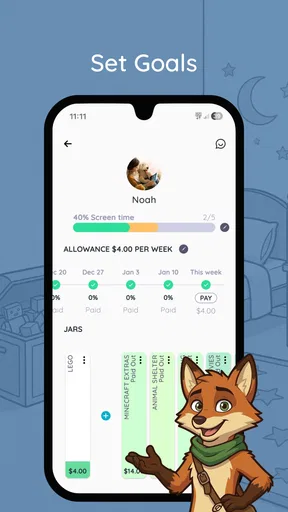
One of the standout features of Homey is its allowance tracker. It’s like having a digital piggy bank for each family member. You can set financial goals, track savings, and even assign chore-based rewards. This is particularly awesome for teaching kids financial responsibility. Imagine being able to say, "Sure, you can buy that game, but have you cleaned your room this week?" It’s a game-changer.
Parents can approve or decline completed chores, ensuring that allowances are earned, not just given. This encourages accountability and helps kids learn the value of money. Plus, seeing their savings grow can be a huge motivator for them to pitch in more around the house.
For the money side to teach anything useful, I would agree in advance on when the balance changes and what a child may do with it. A brief family rule such as “we review approved tasks on Sunday” avoids repeated negotiations after every chore. It also helps distinguish a goal from a promise: tracking savings can support a conversation about waiting and planning, but it does not replace a parent’s decision about whether a purchase is appropriate.
The spend, save, and donate choices are most helpful when treated as options children can discuss, rather than as automatic percentages or rules. A younger child may need a parent to explain what each choice means; an older child may be ready to set a target and check progress independently. I would use the tracker to make those decisions visible, while leaving room for family circumstances to change. A missed week should prompt a practical reset, not a confusing adjustment to what was previously agreed.
Customization and Notifications
Homey shines with its customizable notifications. You can set reminders for when chores need to be completed, ensuring nothing slips through the cracks. This is particularly useful in busy households where everyone’s schedule is packed. The app sends gentle nudges, reminding everyone of their responsibilities without being overbearing.
The app also offers a reward system with virtual badges and achievements. It’s like gamifying chores, which can be surprisingly effective. Who knew that a digital trophy could spark such a sense of accomplishment?
Reminders are most valuable when they support a routine the family has already chosen. If a child gets a prompt at a time when the task cannot reasonably be done, the alert becomes background noise; I would set expectations around a workable part of the day and keep the number of reminders manageable. The same goes for badges: they can make early participation feel fun, but they are not a substitute for a chore that feels fair or for a parent noticing real effort.
Why Homey Stands Out
What really sets Homey apart from other chore apps is its blend of practicality and motivation. It doesn’t just help organize chores; it turns them into opportunities for growth and learning. By incorporating financial education and responsibility, it adds a layer of depth that other apps often miss.
Also, let’s talk about the aesthetic. The design is clean and inviting, with a playful color scheme that appeals to both adults and kids. It doesn’t feel like a chore to use the app, which is a win in my book.
That combination is also the main trade-off. Families looking only for a neutral task board may find the allowance and reward approach unnecessary, while those looking for a detailed household planner may prefer a broader shared calendar or a general to-do app. Those alternatives can be easier if adults mainly need to coordinate errands and schedules rather than teach children about earning and saving. Homey makes most sense when the child-facing routine is the point, not an extra feature attached to an adult productivity system.
I would also avoid treating a digital chart as the only source of truth for chores. If a child does not have access to a device at the moment a job is finished, or a parent cannot review it promptly, a visible paper backup or a quick verbal agreement can prevent confusion. The app can keep the record tidy, but the family still needs a shared understanding of what counts as complete and how disagreements will be handled.
When another approach may fit better
For families with very young children, a picture-based paper chart may be more immediate than asking them to check an app. For teenagers who already manage their own schedules, a simple shared list could feel less parental and require fewer reward mechanics. And if parents do not want to connect chores with money, Homey’s allowance focus may be a mismatch even if its task organization is appealing.
Its current version is 6.2.8, and the app has an average rating of 2.8 from around 677 ratings, with over 100,000 installs. I would take that mixed rating as a reason to test the current experience with a small, low-stakes routine before relying on it for every household responsibility. It is rated Everyone and runs on devices with Android 7.0 or later. Those details make it straightforward to consider as a family app, but they do not remove the need to decide whether its workflow suits your household.
Homey was released on November 26, 2015, and that long presence does not by itself tell me whether it will match a particular family’s expectations today. I would focus less on its age and more on the practical questions that affect daily use: can every family member understand the task, will parents have time to approve it, and does the allowance plan feel fair? If those answers are yes, the app’s combined approach has a clear purpose. If not, a paper chart or a plain shared list may be easier to sustain.
Making the switch without making chores a project
Moving from a paper chart or informal reminders is not difficult because the tasks themselves are complicated; the challenge is getting everyone to follow the same process. I would explain the new routine once, add only the jobs the family has already agreed on, and let children try it before adding more rules. This keeps setup from becoming a second household chore for the parent who is already doing the organizing.
If the family later stops using the app, the important thing to preserve is the agreement, not the digital record. Keep the same task expectations and allowance schedule on a paper list or in a family conversation, then decide whether the app’s reminders and balances were genuinely helping. That makes trying Homey a reversible decision rather than a commitment to build the whole household around one system.
Final Thoughts
In the grand scheme of home management, Homey - Chores and Allowance is a must-have tool for families looking to streamline their routines and empower their kids with financial wisdom. Whether you’re assigning tasks, tracking allowances, or simply trying to keep your household running smoothly, this app is your new best friend.
Ready to transform your household chores from "ugh" to "yay"? Give Homey - Chores and Allowance a whirl and watch as your home becomes a well-oiled machine. Trust me, you’ll wonder how you ever managed without it!
My recommendation is more measured: I would try it if your family wants children to see chores, approval, and money goals in one place, and if a parent can keep the rules steady. I would skip it if you need only a no-frills checklist, dislike rewards tied to household work, or know that nobody will keep up with approvals. With a free starting point and optional in-app purchases, it is reasonable to test on a small scale, but I would not buy into a complicated system before the family has used the basic routine consistently.
Ultimately, the best result is not a perfectly completed dashboard; it is fewer arguments about what needs doing and a clearer conversation about money. Homey can help create that structure, especially for children who respond to visible goals and feedback. Its value depends on the parents using it as a fair record of shared expectations, rather than expecting an app to motivate everyone on its own.
Pros
- User-friendly interface for all ages.
- Customizable chore and allowance settings.
- Real-time progress tracking.
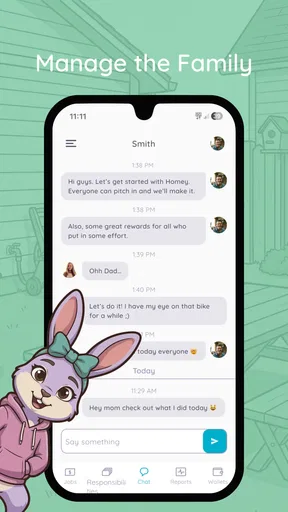
- Family member collaboration features.
- Secure and private data management.
Cons
- Limited free version features.
- No offline mode available.
- Occasional sync issues reported.
- Requires subscription for full access.
- Notifications can be overwhelming.
FAQs for Homey - Chores and Allowance
What is Homey - Chores and Allowance, and how does it work?
Homey - Chores and Allowance is a family management app designed to help organize chores and manage allowances. Parents can assign tasks to their children, track their completion, and reward them with points or money. The app aims to teach children responsibility and financial literacy in a fun and engaging way.
Is Homey - Chores and Allowance suitable for all age groups?
Yes, Homey is designed to be flexible and adaptable for different age groups. While younger children can easily understand and complete basic tasks, the app also allows for more complex chores and responsibilities suitable for teenagers. It’s a versatile tool for families with children of various ages.
Does Homey - Chores and Allowance require a subscription?
Homey offers both free and premium versions. The free version provides basic features such as chore assignment and tracking. The premium version unlocks additional functionalities, including custom allowances, multiple family accounts, and more detailed reporting, which might be necessary for larger or more complex family setups.
How secure is my family’s data on Homey?
Homey prioritizes user privacy and data security. The app uses encryption to protect your data and complies with standard data protection regulations. However, as with any app, users should regularly update the app and use strong, unique passwords to enhance security further.
Can Homey - Chores and Allowance be used offline?
While Homey requires an internet connection for syncing data across devices, most of the core functionalities, such as viewing and completing chores, can be accessed offline. Any updates made offline will synchronize once the device connects to the internet again, ensuring seamless operation.


